
A request is slow. A Kubernetes node is busy. Are the two related?
The application team sees a delayed dependency call. The platform team sees resource pressure. Both could be right, and both could be looking at different things. Before anyone can connect those findings, they need two facts in common: the exact pod that handled the request, and the same time window.
Here’s the catch. By the time anyone investigates, Kubernetes may already have replaced that pod. If your telemetry can’t hold on to the original pod’s identity, you end up attaching yesterday’s request to today’s running workload. The chart looks convincing. It’s just the wrong pod.
This guide walks through how to correlate logs and traces in Kubernetes so the investigation follows the real request, from the slow call to its logs to the workload that handled it.
Start With the Request, Not the Nearest CPU Chart
Take an example. A request takes 960 milliseconds. Inside it, a call to the inventory service takes 840 of those milliseconds.
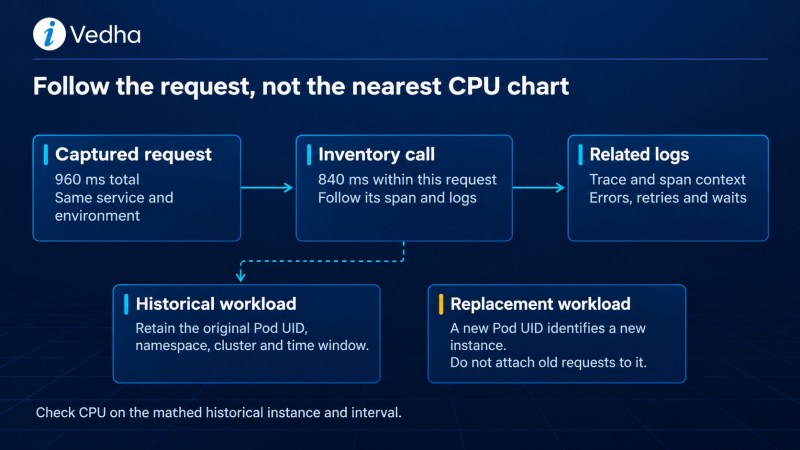
The inventory call is clearly where to look first. But its duration alone can’t tell you why it was slow. A slow query, a wait for a database connection, a queue and network delay all look the same from the outside. So follow that dependency’s own path and let its signals separate the causes.
Now someone adds a CPU chart showing a busy checkout pod. Before you act on it, ask three questions:
- Is it the same pod? A previous pod with the same service name can produce a convincing but irrelevant match.
- Is it the same time window? A wider aggregation window can blur unrelated activity into the picture.
- Is it the right kind of measurement? Even a correctly matched average CPU figure can hide a short burst of throttling.
Here’s how each observation should move the investigation forward.
| What you see | What it tells you | Check next |
|---|---|---|
| Request duration: 960 ms | How long this captured request took | Its child operations |
| Inventory call: 840 ms | Most of the time was spent inside that dependency call | Its span and related logs |
| Busy checkout pod | Resource pressure exists for that pod and time window | Whether pod identity and timing match before blaming it |
This order prevents an expensive detour: adding node capacity because a nearby CPU chart looked busy, before you know where the request actually waited.
Follow the Span Into Its Logs
A span tells you which operation was slow. Its logs tell you what happened inside it: retries, rejected input, a cache miss or a wait for a connection.
To link them, logs need to carry trace context. In Elastic APM’s Node.js log correlation, for example, logs include trace.id plus transaction.id or span.id, and are ingested into the same Elasticsearch deployment that holds the APM data. Field names can differ across SDKs, agents, loggers and ingest paths, so check what your setup actually produces rather than assuming.
Correlation also protects you from false conclusions. Two log lines saying “inventory request timed out” don’t prove a retry loop. They might come from two different requests. Matching trace and span context, timestamps and a retry-attempt field can show that the same operation retried. Now the next check clearly belongs with the inventory client, not an unrelated busy pod elsewhere in the cluster.
Two more rules keep correlation honest:
- IDs show which operation, not why it failed. Keep severity and error details next to the correlation fields. Not every log on the same trace shares the same root cause.
- Unrelated requests should stay separate. If the only way to join a log to a trace is a broad time window, you’re missing an identifier. Attaching that log to the nearest trace makes the screen look complete and the investigation less reliable.
Losing the thread somewhere in your cluster? See how iVedha brings applications, infrastructure and Kubernetes into one Elastic observability platform, from architecture to day-to-day operations.
Keep the Pod That Actually Handled the Request
In Kubernetes, “the checkout pod” isn’t one thing. Pods get replaced all the time, so historical telemetry has to remember which instance it came from.
That means keeping:
- Pod UID, namespace and cluster, so you can tell an old instance from its replacement.
- Service identity and deployment version, so you can connect the request to the application release and compare the workload before and after a change.
That context has to survive the entire collection path. Instrumentation adds the identifiers. Log parsing must keep them in usable fields. Infrastructure enrichment must describe the correct instance, not whichever pod is running now.
One gap to watch: sampling or retention can leave you with a log that has a trace ID but no stored trace to open. That’s a visibility gap worth investigating. It isn’t proof the operation never happened.
Collect Three Views of the Same Workload
Good Kubernetes observability needs three kinds of collection, each doing a different job.

- Node-local collection gathers local logs and workload resource metrics.
- Cluster observation tracks scheduling, pod state and cluster resource conditions.
- Application instrumentation supplies spans for requests and dependency calls.
None of them tells the whole story alone. Kubernetes metrics can show node pressure without explaining why the application made an expensive downstream call. A trace can show where time went without showing whether the pod was constrained. Joining them takes shared identity, consistent timestamps and a supported ingestion path into the Elastic views your teams use.
OpenTelemetry gives you a common framework for instrumentation and telemetry. You still have to decide where collectors run, how resources get enriched, how data is processed, and how to migrate from existing integrations. So don’t stop at confirming that data exports successfully. Test the investigation itself: can the application team and the platform team reach the same request and the same workload from their own views?
Test It Against Real Production Patterns
A retained trace shows the path your instrumentation captured, not every business operation. Sampling changes which traces you keep. And with asynchronous work, a fast API response says nothing about whether the downstream processing finished on time. Context propagation, with the right parent or link relationships, keeps those connections intact across supported boundaries.
That’s why a demo with one synchronous service proves very little. Test a communication pattern your organization actually uses, such as a queue shared by several independently deployed teams. Include a slow dependency, a replaced pod and some missing context. Those are the conditions that show whether your investigation path holds up when production gets messy.
The same choices drive cost. Sample too aggressively and rare failures disappear. Keep every high-cardinality attribute and you burn resources and risk exposing sensitive data. Decide what each investigation needs, then measure its cost under realistic load.
Hand Off the Same Operation, Not a Generic Chart
When one team passes an investigation to another, it should hand over a specific operation, not a CPU chart or an unfiltered log search. For each captured request, keep this small handoff record:
- Trace and span context
- Service and release version
- Event time window
- Historical Pod UID, namespace and cluster
- The matched dependency
- Source references
- Who owns the next test
If a join is missing or uncertain, mark it. Never fill the gap from the pod that’s running now. And when a join fails, check which identifiers actually survived ingestion.
In iVedha’s managed model, the managed team operates the supported platform components, while application teams own meaningful instrumentation and workload validation. A clear handoff record is what makes that split work. Neither team has to start over.
This connects directly to the bigger picture. Correlating logs and traces is one piece of end-to-end observability, where every investigation starts from what the customer actually experienced. And if running the platform is what’s slowing your team down, see how managed Elastic observability in your own Azure subscription takes the upkeep off your plate.
The payoff is worth protecting through every release, collector change and maintenance window. A connected investigation means each team sees how its signals relate to the same request, instead of rediscovering the problem from scratch.
Get Your Logs and Traces Pointing at the Same Pod
If your teams still match logs to traces by timestamp and hope, talk to iVedha’s Elastic team. Bring one service running on Kubernetes. We’ll trace a real request end to end with you, show where context drops out along the collection path, and help you close the gaps before the next incident.
Frequently Asked Questions
How do you correlate logs and traces in Kubernetes?
Instrument your application so logs carry trace and span IDs, keep those IDs in usable fields through log parsing, and enrich telemetry with the Pod UID, namespace and cluster that handled the request. Then both views can be joined on the same operation and workload.
Why does a busy CPU chart point to the wrong pod?
Because pods get replaced. A chart for the currently running pod, or one aggregated over a wide window, can look related to a slow request that was actually handled by a different instance.
What is the Pod UID and why does it matter for observability?
It’s the unique ID Kubernetes gives each pod instance. Unlike a service or deployment name, it changes when a pod is replaced, so it tells you exactly which instance produced a log or handled a request.
Does Elastic APM support log correlation?
Yes. For example, Elastic APM’s Node.js agent can add trace.id and transaction.id or span.id to logs, linking them to the matching trace when both are stored in the same Elasticsearch deployment.
Do I need OpenTelemetry for Kubernetes observability?
Not necessarily, but it provides a common framework for instrumentation and telemetry. You still need to plan collector placement, resource enrichment, processing and migration from existing integrations.